
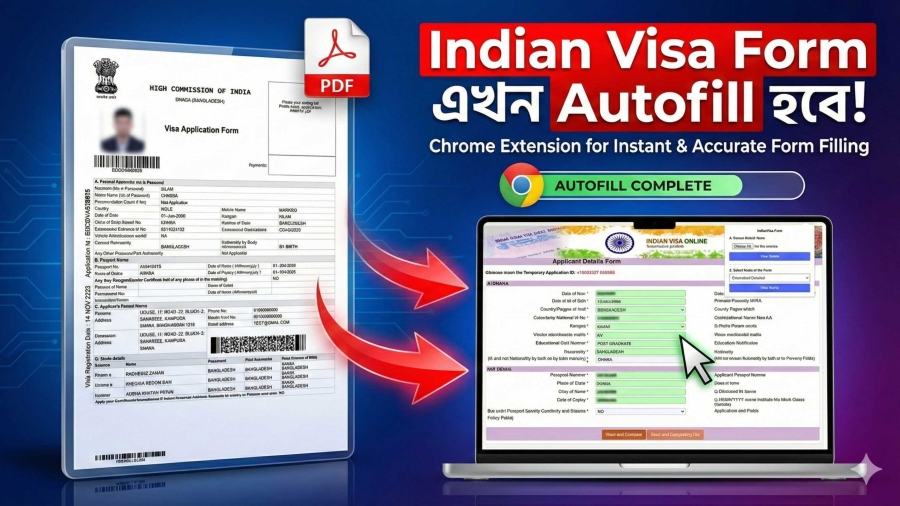
Applying for an Indian Visa is often a stressful, repetitive, and time-consuming process. Whether you are an individual traveler visiting India for tourism, a student applying for a study program, a business professional attending a conference, or a visa agency handling hundreds of applications daily—the task of filling Indian Visa PDF forms is one of the most frustrating parts of the entire process.
Typing the same information over and over, dealing with formatting issues, correcting spelling mistakes, manually entering passport details, filling multiple pages, and ensuring everything matches the required structure can easily take 20–30 minutes per application. This is not only inefficient, but it also increases the risk of errors that may lead to visa delays or even rejection.
To eliminate these problems, NexSoft Studio created Indian Visa PDF Autofill Pro, a powerful automation tool designed to make Indian Visa PDF form filling faster, easier, and 100% error-free. This Chrome extension is built with advanced autofill technology, smart data detection, and an optimized workflow specifically tailored for Indian Visa PDF formats.
This blog will explain in detail everything about Indian Visa PDF Autofill Pro—how it works, why it is the most efficient tool available, who it is for, how it improves accuracy, and how agencies can save massive time and money with this automation solution.
Let’s dive in.
For adding Indian Visa PDF Autofill Pro in your google chrome, cick here.
What Is Indian Visa PDF Autofill Pro?
Indian Visa PDF Autofill Pro is a smart, feature-rich Chrome extension developed to automatically fill Indian Visa PDF forms in just 3–5 seconds. It is designed to handle all standard Indian Visa PDF types, including:
- Tourist Visa
- Medical Visa
- Business Visa
- Student Visa
- Conference Visa
- Entry Visa
- Indian e-Visa PDF forms
- All multipage Indian Visa PDF templates
Video Tutorial
The extension extracts the applicant’s details and enters them into the correct fields in the PDF form instantly, saving manual effort and ensuring a high level of accuracy.
Users can manually input their information, upload structured data, or use passport-based extraction tools. With one click on “Autofill,” the extension automatically fills all pages of the visa PDF with perfect formatting.
This automation tool is ideal not only for individuals, but especially for:
- Visa processing centers
- Travel agencies
- Consultancy firms
- Document preparation services
- BPO/outsourcing companies handling visa applications
- Freelancers offering visa form assistance
- Corporate HR departments assisting employees for India travel
The extension eliminates repetitive work and boosts overall productivity significantly.
Why Indian Visa PDF Autofill Pro Was Created
The Indian Visa PDF form is one of the most detailed and strict formats among visa application systems. It contains multiple pages and fields, including:
- Personal details
- Passport details
- Address information
- Professional background
- Travel history
- Contact information
- Emergency contacts
- Family details
- Travel plans
- References
- Signature and photo sections
Manually typing this information into multiple pages often leads to:
❌ Spelling mistakes
❌ Wrong formatting
❌ Incorrect date structure
❌ Typing errors
❌ Mismatched details
❌ Missing fields
❌ Inaccurate repetition across pages
These mistakes can delay visa processing or result in rejection.
NexSoft Studio identified this problem and created an automation tool that handles the full structure of the Indian Visa PDF format. Indian Visa PDF Autofill Pro was built to eliminate manual errors, reduce processing time, and make the entire process smooth for both individuals and large agencies.
Today, it is one of the most efficient and advanced autofill tools available for the Indian Visa PDF workflow.
How Indian Visa PDF Autofill Pro Works
Indian Visa PDF Autofill Pro has a very simple and user-friendly workflow designed for both beginners and experienced users.
Step-by-Step Usage:
Step 1: Install the Chrome Extension
The extension is available instantly through the Chrome Web Store. Once installed, it appears in the toolbar for quick access.
Step 2: Open the Indian Visa PDF Form
Users can open the Indian Visa PDF form directly in the browser or via a PDF viewer tab supported by Chrome.
The extension automatically detects the form structure.
Step 3: Enter Personal Information
There are three ways to provide application data:
- Manual Input:
Users can type basic details inside the extension interface. - Auto-Saved Profiles:
Frequent applicants or agencies can save profiles for repeated use. - Passport Data Extraction (OCR-Ready Integration):
The extension supports reading passport details using optical character recognition tools (OCR), allowing fast extraction of data such as:- Applicant’s full name
- Date of birth
- Passport number
- Nationality
- Issue & expiry dates
Step 4: Click the Autofill Button
With one click on “Autofill,” the extension automatically fills all the fields in the Indian Visa PDF.
It ensures:
- Correct capitalization
- Correct date format (DD/MM/YYYY)
- Consistent spelling
- Structured formatting
- Repeated fields filled automatically
- Entire multi-page PDF completed in seconds
Step 5: Download the Completed PDF
Once the data is filled, the completed and error-free PDF is ready for:
- Printing
- Uploading
- Submission
This entire process takes 3–5 seconds, compared to the usual 20–30 minutes.
Key Features of Indian Visa PDF Autofill Pro
Indian Visa PDF Autofill Pro is packed with features designed for speed, accuracy, and user convenience.
1. One-Click Autofill Technology
This is the primary highlight of the tool.
Users no longer need to type data manually into every PDF field. The extension automatically fills everything with perfect accuracy.
2. Multi-Page PDF Autofill Support
Indian Visa PDF forms often have multiple pages.
The extension detects all pages and fills them correctly, ensuring data consistency everywhere.
3. 100% Error-Free Form Output
Manual typing can easily introduce errors. The tool ensures:
- No spelling mistakes
- No formatting errors
- No missing fields
- No repetition mistakes
This increases the approval rate of visa applications.
4. Data Privacy and Offline Support
One of the best advantages of Indian Visa PDF Autofill Pro is that it works offline.
Since no data is uploaded to a server:
✔ Your personal information remains safe
✔ Agencies can process sensitive information securely
✔ No internet dependency for filling
✔ More privacy compared to online form fillers
5. Ideal for Visa Agencies
Agencies that process 50–200 visa files daily can save:
- 80–90% time
- Labor cost
- Repetitive workload
- Mistake correction work
- Client dissatisfaction
This leads to more efficiency and higher output.
6. Auto Formatting & Capitalization
The extension ensures:
- Names are capitalized correctly
- Dates follow proper structure
- Addresses follow the correct spacing rules
- Passport numbers match ICAO format
7. Unlimited Autofill Usage
No usage limit. Agencies can process:
- Unlimited clients
- Unlimited PDF files
- Unlimited edits
8. Profile Saving for Frequent Users
Users can save their details for future use.
This is especially useful for:
- Frequent travelers
- Agencies handling repeat clients
- Corporate employees traveling frequently
9. Fastest PDF Autofill Tool for Indian Visa
The speed of Indian Visa PDF Autofill Pro is unmatched.
With optimized PDF handling, even complex forms load instantly and are filled within seconds.
Who Should Use Indian Visa PDF Autofill Pro?
The tool is perfect for:
1. Travel Agencies
Agencies processing Indian Visa applications daily can dramatically improve efficiency.
2. Visa Consultants & Document Specialists
Professionals assisting clients can complete work faster and deliver higher quality output.
3. Individuals Traveling to India
Tourists, students, professionals, or families applying for their own visa can avoid mistakes and save time.
4. Corporate Companies
Companies sending employees to India for meetings, conferences, or projects can simplify the documentation process.
5. Educational Institutions
Universities and colleges assisting students traveling to India can use this tool for quick visa form preparation.
Why Indian Visa PDF Autofill Pro Is the Best Tool for Visa Form Automation
Here are the reasons why this tool stands out:
✔ Speed
Fills the full PDF in seconds.
✔ Accuracy
No typos. No formatting errors.
✔ Security
Offline processing ensures complete privacy.
✔ Convenience
Easy-to-use interface, ideal for beginners and professionals.
✔ Scalability
Perfect for agencies handling high-volume applications.
✔ Dedicated for Indian Visa PDF Format
Unlike general PDF fillers, this tool is built specifically for Indian Visa structure.
✔ Saves Time and Money
Less manpower, less time, more efficiency.
How This Tool Helps Increase Visa Approval Rate
Most rejections happen due to:
- Typing errors
- Incorrect date formatting
- Misspelled names
- Wrong passport numbers
- Inconsistent details across pages
- Missing mandatory fields
Indian Visa PDF Autofill Pro eliminates these issues completely.
Consistent, error-free data improves visa approval chances and removes the risk of rejection due to form mistakes.
What Makes This Tool Different From Other Autofill Solutions?
There are other PDF tools online, but none offer:
- Dedicated Indian Visa PDF support
- Structured field detection
- Auto-formatting
- Multi-page autofill
- Offline privacy
- Unlimited usage
- Passport OCR compatibility
Most online solutions only fill basic PDFs.
Indian Visa PDF Autofill Pro is built specifically for Indian Visa applications.
Future Updates & NexSoft Studio Vision
NexSoft Studio is continually adding improvements, including:
- Full OCR integration
- Passport MRZ scanning
- Address auto-detection
- AI-based field validation
- Mobile support
- Multi-language UI
The extension evolves with user needs and visa document updates.
Final Thoughts
Indian Visa PDF Autofill Pro is not just a tool—it is a complete workflow automation system for Indian Visa PDF form filling. Whether you’re an individual planning a trip or an agency managing hundreds of clients, this extension simplifies your work, saves time, reduces errors, and ensures a smooth visa application process.
If you want to avoid mistakes, speed up your work, and make the Indian Visa application process effortless, Indian Visa PDF Autofill Pro is the best tool available today.